


Rover – Pet Sitters
4.58.95K Reviews
App Specs
- Version
- 26.0805.01
- Updated On
- License
- Free
- Downloads
- 5,000,000+
- Developer
- Rover.com
- Categories
- Travel & Local
- Platform
- Android, iOS
Screenshots


 Analysis by AppCompare
Finding care for a pet can feel like a bigger job than planning your own day away. You are choosing someone who will handle your dog’s routines, not simply arranging a convenient pickup. I like that Rover - Dog Boarding & Walking brings several kinds of neighborhood pet care into one place, so a first-time user can begin with a specific need rather than figuring out a whole new system.
What to expect before you book
Rover is a free travel and local app from Rover.com, built around connecting pet owners with nearby care providers. Its focus is practical: dog walking, boarding, sitting, and day care are the kinds of help you can look for. It has an average rating of 4.6 from around 46,000 ratings, and more than 5 million installs, which suggests it has reached a broad audience of pet owners. The app is rated for Everyone, and its current version is 26.0429.01.
The important distinction is that browsing profiles is only the start of choosing care. A useful match depends on your pet’s temperament, your schedule, and the kind of attention you expect. For a first booking, I would treat the profile as a starting point for a conversation, not as a guarantee that a sitter will suit every dog. A highly rated person may still be a poor fit for a dog that is anxious around other animals or needs a very specific routine.
That is where the app’s combination of service types helps. If you need care for a few hours, a walk or day-care arrangement may make more sense than an overnight stay. If you will be away, boarding or sitting may be more suitable. Thinking through the actual gap in your pet’s day before searching makes the results easier to evaluate and helps you ask focused questions.
Getting set up without rushing
When you open the app, start by looking for the service that matches your situation and entering the location and timing you need. Rover’s interface makes those first steps approachable, even if you are not especially comfortable with apps. Search filters can help narrow options, but I would avoid treating the first available profile as the obvious choice. Availability tells you who might fit the calendar; it does not tell you who fits your pet.
Before messaging anyone, make a short list of details that could affect the match: feeding times, walk habits, medication or other care instructions, how your pet reacts to strangers, and anything that reliably causes stress. You do not need to write a long biography. A few clear facts help a sitter understand what the job involves and give you a better sense of whether they are comfortable with it.
Profiles give you a useful basis for that comparison. Look beyond a flattering photo or a brief introduction: experience, reviews from other owners, and the way a person describes their care can help you decide what to ask next. I find it more reassuring to compare how a sitter’s stated approach fits my dog than to focus only on a general impression of friendliness.
Worth Reading Before You Choose

EA SPORTS FC Mobile 26 Is a Bigger Football Game, but It Takes Time

Flipboard Shows What News Apps Must Do Beyond the Feed

Switching to Android Auto Means Rethinking Your Driving Routine

Google Calendar Makes a Crowded Week Easier to Manage

Ludo King Makes the Most of the Minutes Between Plans

Baby Panda World Brings Quick Play to Modern Phones, but Its Game Library Feels Busy
Turning a search into a first successful booking
Once a profile looks promising, use the in-app chat to ask practical questions before committing. Explain your pet’s normal routine and ask how the sitter would handle the parts that matter most to you. If you are considering a longer stay, a meet-and-greet can make the decision feel more grounded: you can see how your dog responds to the person and discuss expectations face to face. It is a sensible step for a first booking, especially when your pet is cautious or has not stayed away from home before.
A realistic first use might be arranging a walk during a long workday. I would search for a suitable time, compare a few profiles, then message the strongest candidate with the dog’s usual walking pace and any relevant behavior notes. After agreeing on the details, the booking and payment can be handled through the app. For an overnight stay, the same basic workflow needs more preparation: share feeding and sleeping routines, confirm what the sitter is comfortable handling, and leave enough time to resolve questions before departure.
Rover has been available since August 14, 2013, and is designed for Android devices running version 10 or later. That makes it a mature service rather than a brand-new experiment, though the quality of your experience still depends on the individual match in your area. I would use the app to organize the search and conversation, while making the final decision based on the sitter’s answers and my pet’s comfort.
Connecting with Trusted Sitters
First off, the app’s interface is super user-friendly. I mean, even if you’re not a tech whiz, Rover makes it easy to navigate through its features. When I first opened it, I was greeted with a clean and intuitive layout that made finding a sitter a breeze. You can search by location, availability, and even specific services like dog boarding or house sitting.
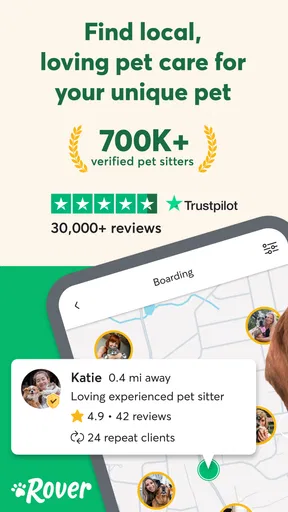
What I love most is the detailed profiles of the sitters. Each profile includes their experience, reviews from other pet owners, and photos, which really helped in making an informed decision. It’s like having a mini interview right at your fingertips.
Booking Made Easy
Once I found the perfect sitter for my pup, booking was as simple as a few taps. The app allows you to schedule meet-and-greets, which is a fantastic way to ensure that both you and your dog are comfortable with the sitter. Plus, the integrated chat feature means you can communicate directly with the sitter, ask questions, and discuss any special needs your pet might have.
Payment is handled securely through the app, which gave me peace of mind. No awkward cash exchanges or worrying about leaving out a check. Everything is streamlined, ensuring a hassle-free experience.
Peace of Mind with Real-Time Updates
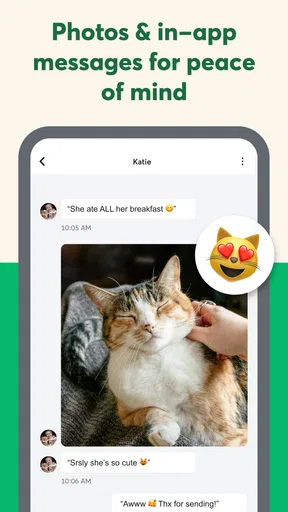
One of the standout features for me was receiving real-time updates and photos of my dog while I was away. There’s nothing quite like seeing your pup having a blast with their sitter when you’re miles away. Knowing that your pet is happy and well-cared for is priceless, and Rover delivers on that front.
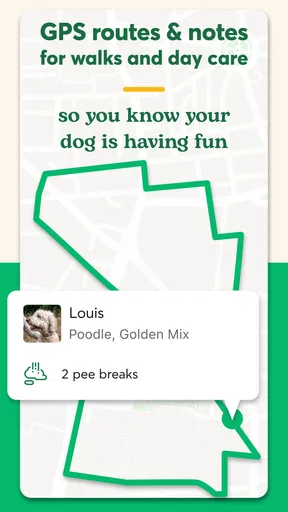
Additionally, the app offers GPS tracking for walks, so you can see where your dog has been exploring. It’s a nice touch that adds an extra layer of security and transparency.
More Than Just Dogs
While it’s called Rover, the app isn’t just for dogs. If you’ve got a cat, bird, or even a reptile, there are sitters available who can cater to those needs as well. It’s a comprehensive service for all pet lovers, which makes it incredibly versatile. I’ve recommended it to friends with cats, and they’ve had equally positive experiences.
Community and Support
Another aspect I appreciated was the community feel. The reviews and ratings system creates an environment where sitters strive to offer the best service possible. Plus, if you ever encounter any issues, the app’s support team is responsive and helpful. They’re just a tap away, ready to assist with any concerns you might have.
Where the convenience has limits
The app’s main strength—putting independent local sitters within reach—is also its biggest trade-off. A polished profile and positive reviews can help you shortlist people, but they cannot replace a conversation about your pet’s individual needs. I would not book solely because someone is nearby or has an open slot. For a dog that guards food, struggles with separation, or needs careful introductions, the sitter’s actual plan matters more than a quick match.
It is also worth keeping expectations about updates realistic. Photos and walk tracking can make an arrangement feel more transparent, but they are a window into parts of the care, not a substitute for agreeing in advance on communication. Before the booking, ask what sort of updates the sitter normally sends and when you should expect them. That small conversation can prevent you from checking your phone repeatedly and wondering whether silence means everything is fine or a message was missed.
Compared with asking a friend or neighbor, Rover can make it easier to compare several care providers and keep the booking conversation in one place. A familiar person may still be the better choice if your pet already trusts them or needs a routine that is hard to explain to someone new. Compared with a traditional kennel or daycare facility, the app offers a way to look for individual care nearby, but that does not automatically make a home setting right for every dog. Some pets do better with a structured facility; others are calmer with one-on-one attention. I would choose based on the pet, not on which option sounds more modern.
Questions worth settling before the first visit
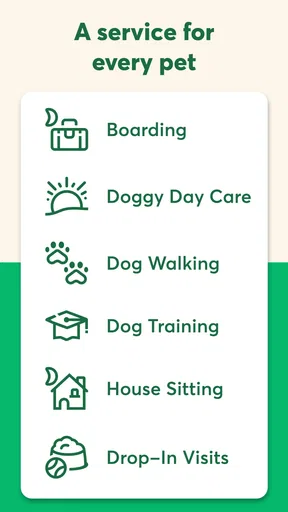
If you are unsure whether to choose a walk, day care, boarding, or sitting, start with the length and nature of the time your pet needs covered. A walk is a focused outing; day care is a broader daytime arrangement; boarding or sitting is more relevant when your absence extends beyond that. The labels help you begin a search, but the details should be clarified with the provider so you know what the arrangement means for your own dog.
For pets with special instructions, ask directly whether the sitter is comfortable following them and explain what a normal day looks like. Do not assume a short profile description covers medication, unusual behavior, or a strict feeding routine. A clear, written message in the chat is useful because both sides can refer back to the agreed details instead of relying on memory during a busy handoff.
And if the first profile does not feel right, there is no reason to force the choice just because the search has taken time. You can compare another provider, adjust the dates if that is possible for your plans, or ask someone your pet already knows. That is not a failure of the app; it is a reminder that convenience is valuable only when the care arrangement also feels suitable.
Who will get the most from it
I think Rover is most useful for people who need flexible local help and are willing to spend a little time choosing the right person. It can be especially helpful when a workday changes, a trip is coming up, or a usual caregiver is unavailable. The first booking takes more thought than tapping through a delivery order, but once you know what questions matter for your pet, the search-and-chat process becomes easier to manage.
On the other hand, I would not rely on it as a shortcut for urgent care if you have no time to review profiles or discuss expectations. It may also be a poor fit if you strongly prefer a single established facility, or if your pet cannot safely be cared for by someone unfamiliar without a gradual introduction. In those situations, a trusted personal contact or a specialist you already know may be the calmer option.
Overall, my experience with Rover - Dog Boarding & Walking has been nothing short of fantastic. It’s a game-changer for pet owners who want to ensure their pets are in safe and loving hands. Whether you need a dog walker for the afternoon or a sitter for a weekend getaway, this app has got you covered. Give it a try the next time you need pet care, and I’m sure you’ll be as impressed as I was!
Pros
- User-friendly interface for easy navigation.
- Wide range of pet care services available.
- Real-time updates from pet sitters.
- Verified reviews for trust and reliability.
- Secure online payment options.
Cons
- Limited availability in rural areas.
- Service fees can be high.
- Occasional app glitches reported.
- Profile verification process is lengthy.
- No emergency contact feature available.
FAQs for Rover – Pet Sitters
What is Rover and how does it work?
Rover is a platform that connects pet owners with trusted dog sitters and walkers. Users can browse profiles, read reviews, and book services directly through the app. The app offers a secure way to find pet care solutions, whether for boarding, house sitting, or daily walks.
Is Rover safe and reliable for my pet?
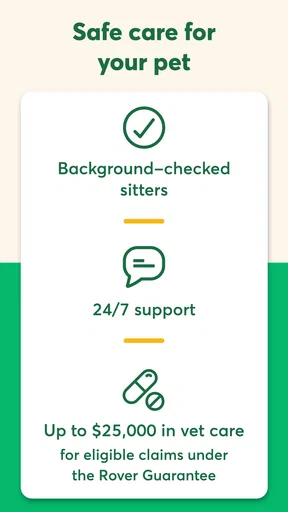
Rover ensures safety and reliability by conducting background checks on sitters and walkers. The app includes detailed profiles and reviews from other pet owners. Additionally, Rover offers insurance coverage for pets during booked services, providing peace of mind for users.
How do I book a service on Rover?
To book a service, first create a profile for your pet, then browse available sitters or walkers in your area. Once you find a suitable match, you can send a booking request. The sitter or walker will confirm the booking, and you can communicate directly through the app to finalize details.
What are the costs associated with using Rover?
Prices on Rover vary based on the type of service and the individual sitter or walker. Each provider sets their own rates, which are visible on their profiles. Rover may also charge a booking fee. It's advisable to review costs and terms before confirming a service to ensure it fits your budget.
Can I cancel a booking on Rover, and what is the refund policy?
Yes, you can cancel bookings on Rover, but the refund policy depends on the sitter's cancellation terms. Each service provider may have different policies, ranging from full refunds to partial refunds, depending on how far in advance you cancel. Always check the cancellation policy before booking.


